Inventory
Once at least one connector is onboarded, Cyscale will periodically sync it. This results in an Inventory section that lets you move between:
- Overview for quick filters and investigation entry points
- All Assets for the full asset list
- Grouped by Asset Type for a coverage-oriented view
- Query Builder for custom investigations and control authoring
- AI Security for AI-specific inventory and AI-BOM workflows when the module is enabled
The exact asset types available depend on the connected providers and the services Cyscale currently covers for them. You can review provider-specific coverage from the connector pages and from the provider details shown during onboarding.
Filtering
The Inventory can include hundreds or even thousands of assets. To keep investigations practical, Cyscale provides a filter palette for common properties such as Provider, Connector, Region, Asset Category, Asset Type, and Tags.
Besides these, Cyscale supports security-centric filters such as Security Score and Failed Controls, and many asset-specific properties exposed by the underlying resource model.
Asset Category
Asset Category lets you focus on broad resource families such as Compute, IAM, Data, Networking, Kubernetes, Vulnerabilities, and AI Services.
When AI Security is enabled, AI-related assets are grouped under AI Services. Use this filter to find AI models, endpoints, datasets, feature stores, AI services, and AI workloads without mixing them with the general asset list.
Security Score
The asset score is a metric that indicates the security impact of an asset. When filtering by score, you can choose from 4 options:
- Minimal Risk: 100% score (or no risk detected by Cyscale)
- Low Risk: 76% - 99% score
- Medium Risk: 51% - 75% score
- High Risk: 0% - 50%
This will allow you to check which are the most insecure assets and focus on remediating them to increase your overall security posture.
You can combine this filter with any other to get powerful insights like "AWS Virtual Machines with High Risk" or "Assets with env: production tag with Medium Risk".
For more information check Asset Score Page.
Failed Controls
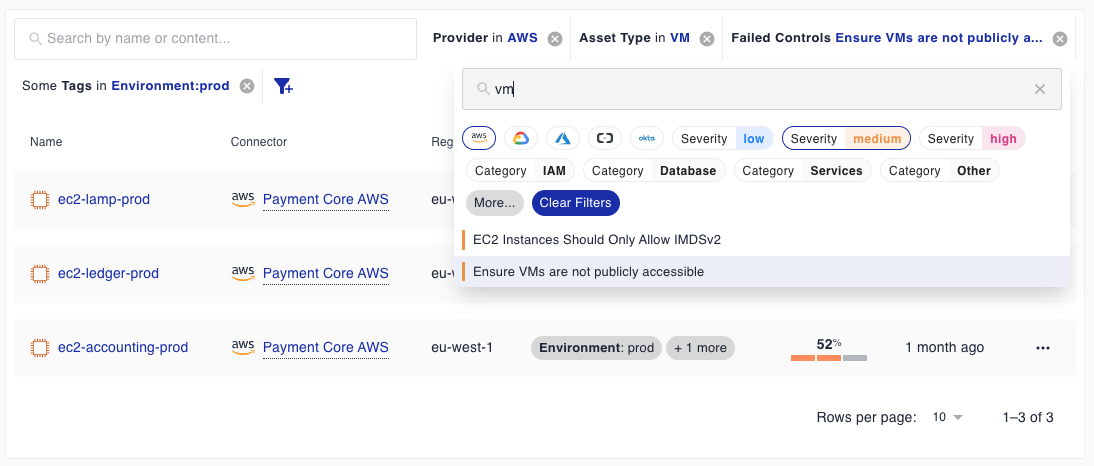
Another powerful filter is Failed Controls. This will allow you to filter the inventory based on specific security controls like "Ensure VMs are not publicly accessible".
When this filter is applied, the inventory will display all the assets impacted by a control (notice that secondary impacted assets are displayed as well, check Alerts Page for more details about this).
We've created an intuitive yet familiar control selector which allows you to search for controls based on Name, Provider, Severity and Category. You can then click to select one or multiple controls. Notice that you can only select Failed controls.
For example, you can combine this filter with any other to get valuable information of "Production AWS Virtual Machines publicly accessible from the Internet":
Query Builder
Query Builder is designed for investigations that go beyond the standard filter palette.
You can:
- choose a supported resource type from the resource browser
- build nested filters, including
ANDandORlogic - start from built-in examples for common investigations
- inspect the generated query definition and run it directly against your inventory
- save a useful query as a custom control when you want to operationalize it
This is especially useful when you want to express a cloud-specific condition such as exposed admin ports on VMs, public buckets without encryption, or databases with weak TLS settings without waiting for a predefined view.
For detailed usage, see Query Builder and Custom Controls.
Asset Insights
Cyscale can show computed properties and relationship-based insights directly on asset pages. These insights are based on the security knowledge graph and can include public exposure, in-use public IPs, Kubernetes workload context, identity relationships, vulnerability context, and AI-specific details.
For more details, see Knowledge Graph Insights.